
Your show.
Audio, video and lights
on a single timeline.
Design, sync and run professional-quality shows — without being a technician, without a big-production budget.
Your first show ready in hours, not days.
Syncing audio, video and lights takes multiple tools, technical skills and unpredictable setup times. The result: every show costs too much, is hard to repeat and rarely reflects the quality of your artistic work.
One environment. Your whole show.
What used to require a tech team and multiple tools is now within reach of a single artist.
One synced timeline
Audio, video, lights and lyrics on a single timeline. Everything starts together, always in time.
Windows and Mac
The only one in its segment that runs on both platforms. Work on your computer, whatever it is.
Repeatable on every date
Save the project once. Reopen and reuse it at every gig, without starting from scratch.
No advanced skills needed
You don't need high technical skills: bring a vision, IAMOS handles the rest. The result will be professional from the first rehearsal.
The Designer: your whole show, FREE
Everything you need to build and run your show, in one place.
Build the setlist
Organize songs, scenes and timing visually and precisely.
Audio under control
Multitrack backing and routing on professional interfaces, without a DAW.
Lyrics & scores in time
Teleprompter and scores that scroll in sync with the performance.
Visuals on the beat
Trigger video and stage content aligned to the music, seamlessly.
Integrated lights
Program lights on the same timeline as audio and video. One control room.
Control from the stage
Run the whole show from your smartphone, without touching the main computer.
Windows & Mac · no card required
Your whole show, in your pocket
Scrolling lyrics, setlist and remote control: run your performance from your smartphone on stage, without touching the computer.
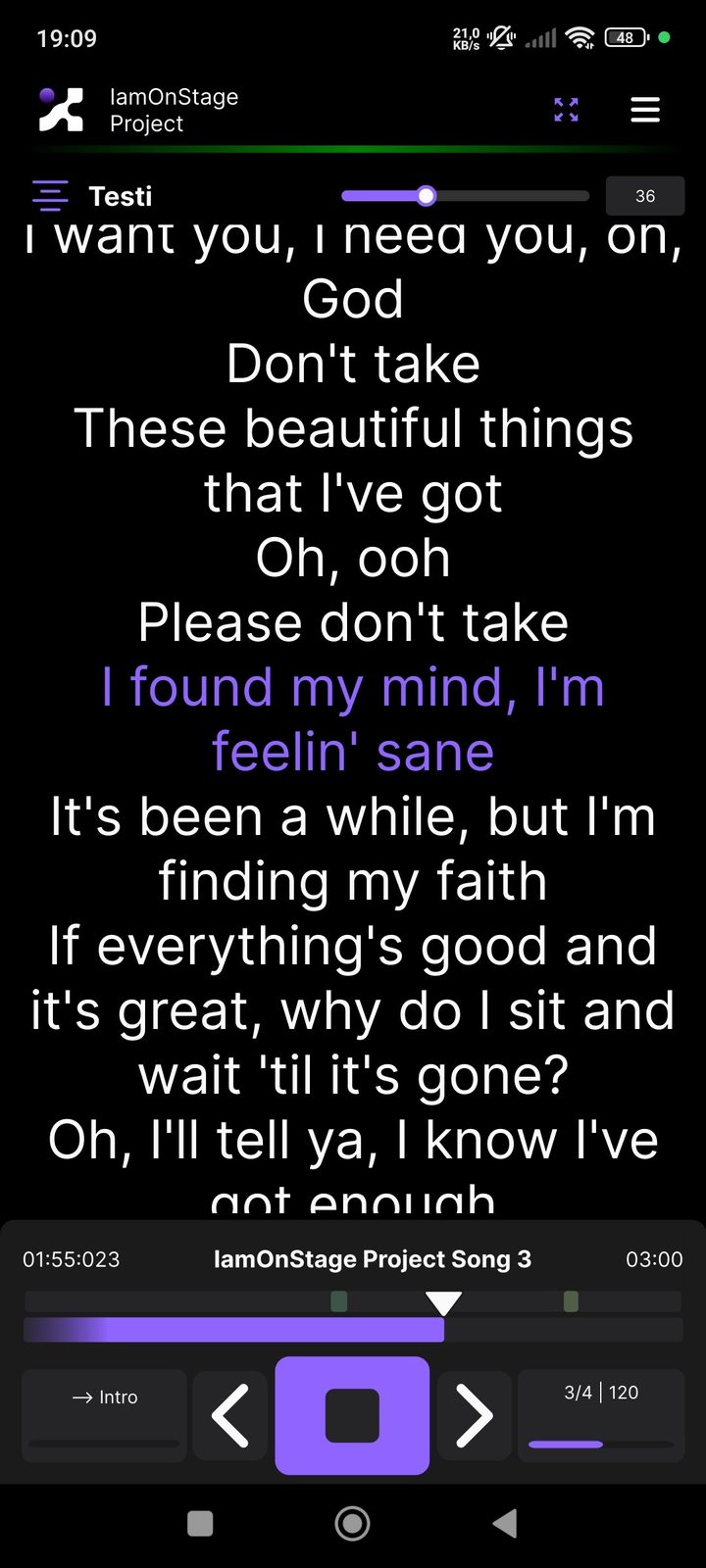
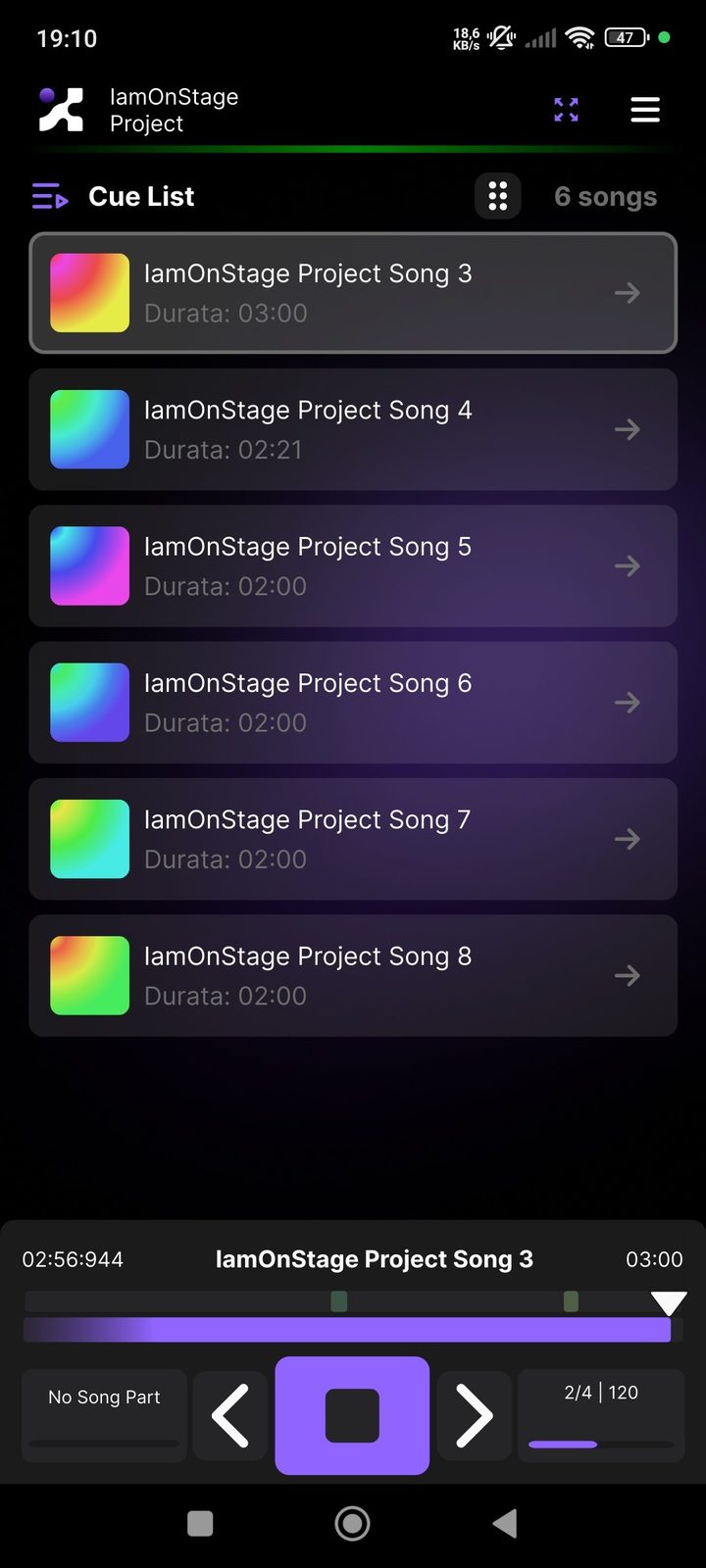
Included in Designer PRO · iOS & Android
From screen to stage
IAMOS explained in seconds — and the result live, on stage.
Choose how you take the stage
Start with Designer FREE. Add power when you need it.
Designer FREE
- Design the full show
- Audio, video, lights, lyrics
- Windows & Mac
- No card required
Designer PRO
- Everything in Designer FREE
- Performer app included
- Your own VST and AU plugins
- Multi-layer video, no watermark
- SMPTE timecode and dynamic values
Business
- Several licences for your team
- Software tailored to your needs
- Assisted setup and rollout
- Dedicated training
- Priority support
Let's talk
Tell us about your project: you will hear back from us directly.
FREE and PRO compared
Designer FREE has no limit on projects, songs or tracks: it unlocks the full power of the software. The PRO version adds the advanced features and the Performer app, which puts the show straight onto the phone of whoever is on stage.
| Features side by side | Designer FREE Download | Designer PRO Coming soon |
|---|---|---|
| Unlimited projects, songs and tracks | included | included |
| Multitrack audio, mixer and output routing | included | included |
| Synced lyrics, PDF sheet music and chords | included | included |
| Video synced to the song, overlays and playlists | included | included |
| DMX lights, MIDI, OSC and control surfaces | included | included |
| Control view and action matrix | included | included |
| Windows and Mac, up to 3 devices | included | included |
| Your own VST and AU plugins In FREE third-party plugins stay in the project but do not play. | not included | included |
| Multiple video layers, no watermark In FREE the first video clip is clean, the others carry the watermark. | One clip | included |
| Dual-voice lyrics and a dedicated chords screen | not included | included |
| Custom voice-overs | not included | included |
| SMPTE timecode (MTC and LTC) | not included | included |
| Dynamic values and automation curves | not included | included |
| Remote control of the show | not included | included |
| Lyrics | not included | included |
| Chords | not included | included |
| Sheet music | not included | included |
| Action matrix | not included | included |
| Visual metronome | not included | included |
| Audio metronome | not included | included |
On the FREE plan all your work stays saved and editable; the PRO features are fully back the moment the licence is activated.
Learn IAMOS in minutes
Short, practical video guides: from setlist to audio, from lyrics to lights. All on our YouTube channel.
First lessons: the guide to IAMOS
Twelve practical guides, one for each Designer feature. Open the article and watch the tutorial.
Guide
Start here: IAMOS Designer in 2 minutes
Ever wished your whole show lived in one place — backing tracks, video, lights and lyrics — without learning three programs or hiring a crew? That's exactly what IAMOS Designer does.
Read the article →
This first video of Series 0 is a complete overview: how the software looks when you open it, how it's organized and what you can do from the very first minutes. No manuals, no endless setup — one environment where every part of your show has its place on a shared timeline.
In under two minutes you'll see the six main sections — Studio, Mixer, Lyrics, Video, Show Control and On-Stage — and how they connect. Watch it, open the software and start building your show.
Watch the tutorial →
Setlist
Your setlist, finally under control
A setlist isn't just a list of songs. It's the backbone of your show, the structure behind every artistic and technical decision of the night. IAMOS Designer gives you a dedicated tool to build it, edit it and keep it at hand on stage.
Read the article →
In the Studio section you create your show project and arrange songs in any order. Add a track, move it, rename it: it happens instantly, without starting over each time you change your mind.
Once built, the setlist becomes the structure for everything else — each song is a container for backing tracks, video, light scenes and lyrics. This 90-second lesson shows how to add songs and how IAMOS organizes them.
Watch the tutorial →
Audio
Audio on stage: everything in one screen
Audio is the heart of every performance. Whether you work with backing tracks, loops or multiple files per song, IAMOS Designer gives you a dedicated section — the Mixer — to manage it all clearly.
Read the article →
You'll see how to load your audio files into each song, assign tracks to separate channels, set levels and get ready for a live show that sounds exactly as you planned.
The Mixer doesn't replace your production DAW: it works downstream, when the material is ready for the stage. And because the project is saved, you reopen and reuse it on every future date — no setup to redo.
Watch the tutorial →
Tempo
No more memorizing BPM: the visual metronome
Tempo is the spine of every performance, and losing it on stage is one of the most visible — and most avoidable — mistakes. IAMOS Designer includes dedicated tools to keep you aligned with your show.
Read the article →
The core feature here is the visual metronome: a clear reference, always visible during the performance, showing the BPM set for each song. No more relying on memory or feel.
You can configure the BPM per song and combine it with Ableton Link to sync IAMOS with other devices or your DAW in real time. The result is a more solid, repeatable show.
Watch the tutorial →
Lyrics
Your lyrics on stage, always at the right moment
How many times have you seen an artist lose their place in the lyrics? The Lyrics section of IAMOS Designer exists to remove that problem.
Read the article →
In this 2-minute tutorial you'll see how to add the lyrics of each song directly inside the show project. Every song has its own space, and IAMOS shows them in sync during the performance.
Use the Lyrics section as a personal prompter, or project the words to the audience or your bandmates. One project, everything connected to the exact song where you need it.
Watch the tutorial →
Video
Video in sync with the music, with no dedicated operator
Adding video to a live performance is one of the most effective ways to raise the visual level of your show. The usual problem is that syncing it requires separate software and a dedicated operator. IAMOS solves it differently.
Read the article →
The Video section lets you load your visuals, backdrops and clips and link them to the songs in your setlist. Once set, the video starts exactly when you want — on a cue, in loop or one-shot.
Everything happens in the same environment where you manage audio, lights and lyrics, so you can bring a professional visual dimension even without a video operator.
Watch the tutorial →
Lights
Programmed lights, repeatable show: DMX in IAMOS
Lights are the difference between a concert and a show. But programming them has always been one of the most technical and expensive parts of a production. IAMOS brings light control into the same platform.
Read the article →
The Show Control section lets you configure DMX fixtures, create light scenes and link them to songs or precise moments. Each scene is saved in the project: next time, your lights are already there.
This is the longest lesson of the series — almost 7 minutes — because lighting deserves it. The key point is repeatability: build your light design once and every future date starts from there.
Watch the tutorial →
Control
Take control of the show with control surfaces
You've loaded everything: audio, video, lights, lyrics. Your show project is complete. But during the live, how do you trigger it? The answer is control surfaces.
Read the article →
IAMOS Designer supports physical controllers — MIDI keyboards, pads, footswitches — to drive the software during the performance. You'll see how to connect a device and map buttons to actions: advance the setlist, start a song, trigger a light scene or a video cue.
A control surface frees your hands: you can play, move and engage the audience while the controller does the work, on your command.
Watch the tutorial →
Scores
Scores and lyrics as PDF: project them live, automatically
So far you've seen lyrics typed directly into IAMOS. But what if you work with scores or chord charts as PDFs? Now you can load them into the software and project them during your show — with page turns synced to the performance.
Read the article →
Load the PDF into the matching song in your setlist, and IAMOS handles it during the show: the right page appears at the right moment, automatically or via your control surface.
Especially useful for ensembles, bands and worship leaders with large repertoires — but it works for any performer who wants their written references inside the show.
Watch the tutorial →
Workflow
Adding audio, video and lights to a song
You've learned the individual sections. Now it's time to put it all together. This is the most hands-on tutorial of Series 0: in almost 6 minutes you build a complete song in IAMOS, from zero to stage-ready.
Read the article →
The video walks you through adding all three elements of a show cue: the audio (your backing tracks and loops), the video associated with that moment, and the lights — the DMX scene you want to trigger.
A well-built show project is an asset: do it once before the date, and it repeats identically at every show. You open it next week, in another city, and it's all there.
Watch the tutorial →
Video output
How to set up video output for the stage
You've created your video content and linked it to the songs. The next step is getting it out of the software the right way: on the right display, at the right resolution, at the right time.
Read the article →
The Video section lets you choose which screen or display receives the video output during the show — a projector, an LED wall, a stage monitor or a secondary display.
In under 3 minutes you'll see how to select the correct display and check everything before going on stage. Tip: configure the output during rehearsals — IAMOS remembers the settings in the project.
Watch the tutorial →
OSC & MIDI
OSC and MIDI: connect IAMOS to your other devices
Ever felt your live setup has too many separate pieces — one app for lights, one for audio, a controller that talks to no one? IAMOS Designer supports OSC and MIDI messages to connect the software with your other devices and apps.
Read the article →
This tutorial covers configuring OSC (Open Sound Control) and MIDI in IAMOS. You can send and receive messages to and from other software or hardware. Each action can become a trigger, and external signals can control events inside IAMOS.
You don't need to be a protocol expert: the tutorial explains the basics and shows how to set OSC addresses and MIDI channels in a practical way.
Watch the tutorial →Frequently asked questions
What is IAMOS?
Which devices does it run on?
How much does it cost?
Do I need to be a technician to use it?
What's the difference between Designer and the Performer app?
Can I reuse the same show across multiple dates?
Does IAMOS replace my DAW?
Is there a community?
The stage won't wait.
Your show is ready in hours.
Download Designer FREE or write to us: we'll be happy to help.